A family physician talking with a patient in a bright clinic exam room
PHOTO: hero.jpg2400 × 1200 px, landscape, under 400 KB. Family doctor with a patient in a bright BC clinic; keep the left 45% calm for the text card.

For BC clinics

One platform for your whole clinic

Booking, virtual visits, eFax, referrals, MSP billing and a patient app, all in one secure system built for BC family practice. Start with one module, or run everything on it.

Book a demo

Already a Verified Connect clinic or patient? Sign in

Complete clinic software from a single platform

For the front desk, the doctor, the patient and the clinic manager

Fewer logins, fewer phone calls, less paper. Everyone works from the same schedule and the same record.

Run the day from one screen

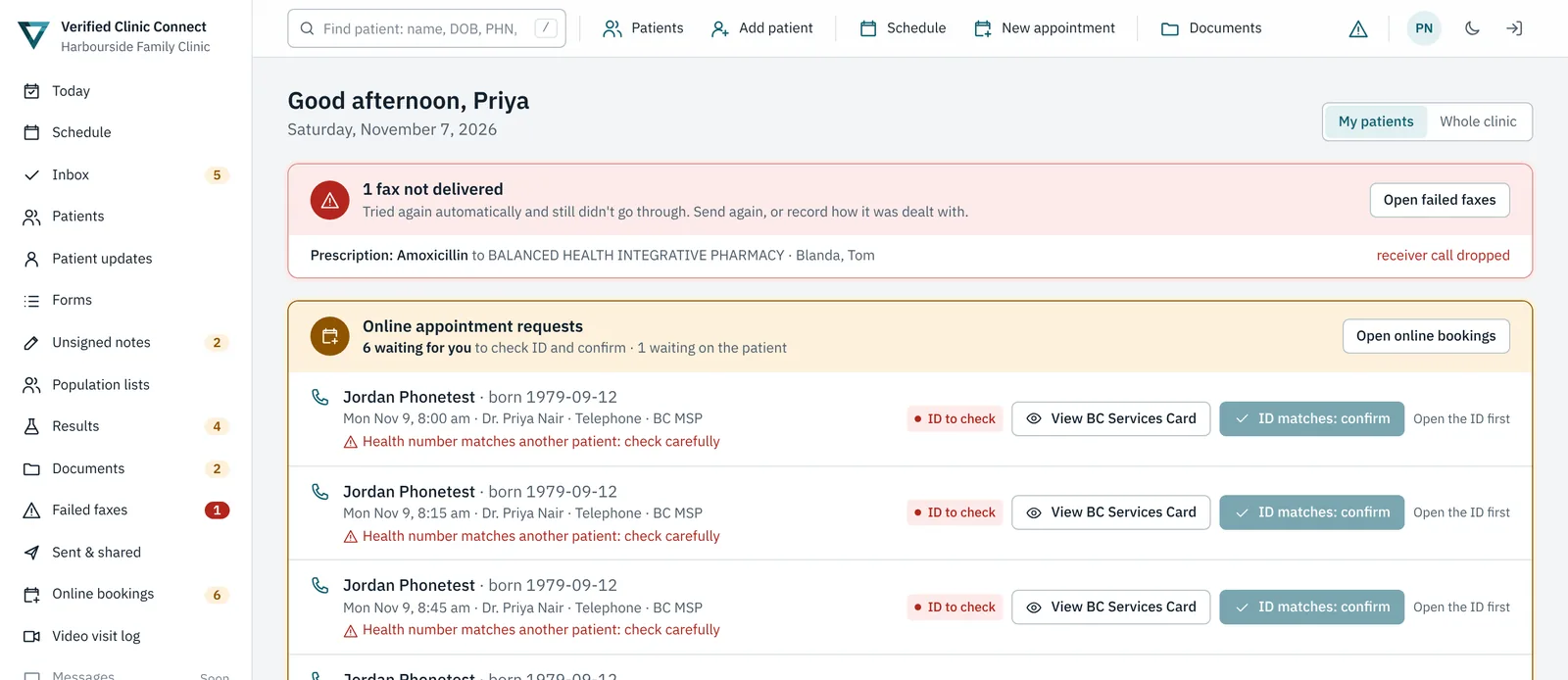
  • Today dashboard: check-ins, online booking requests, failed faxes and results waiting, in one place.
  • Online booking: patients book video or phone visits themselves, with ID checks for new patients.
  • Reminders: automatic texts the day before and an hour before each visit help cut no-shows.
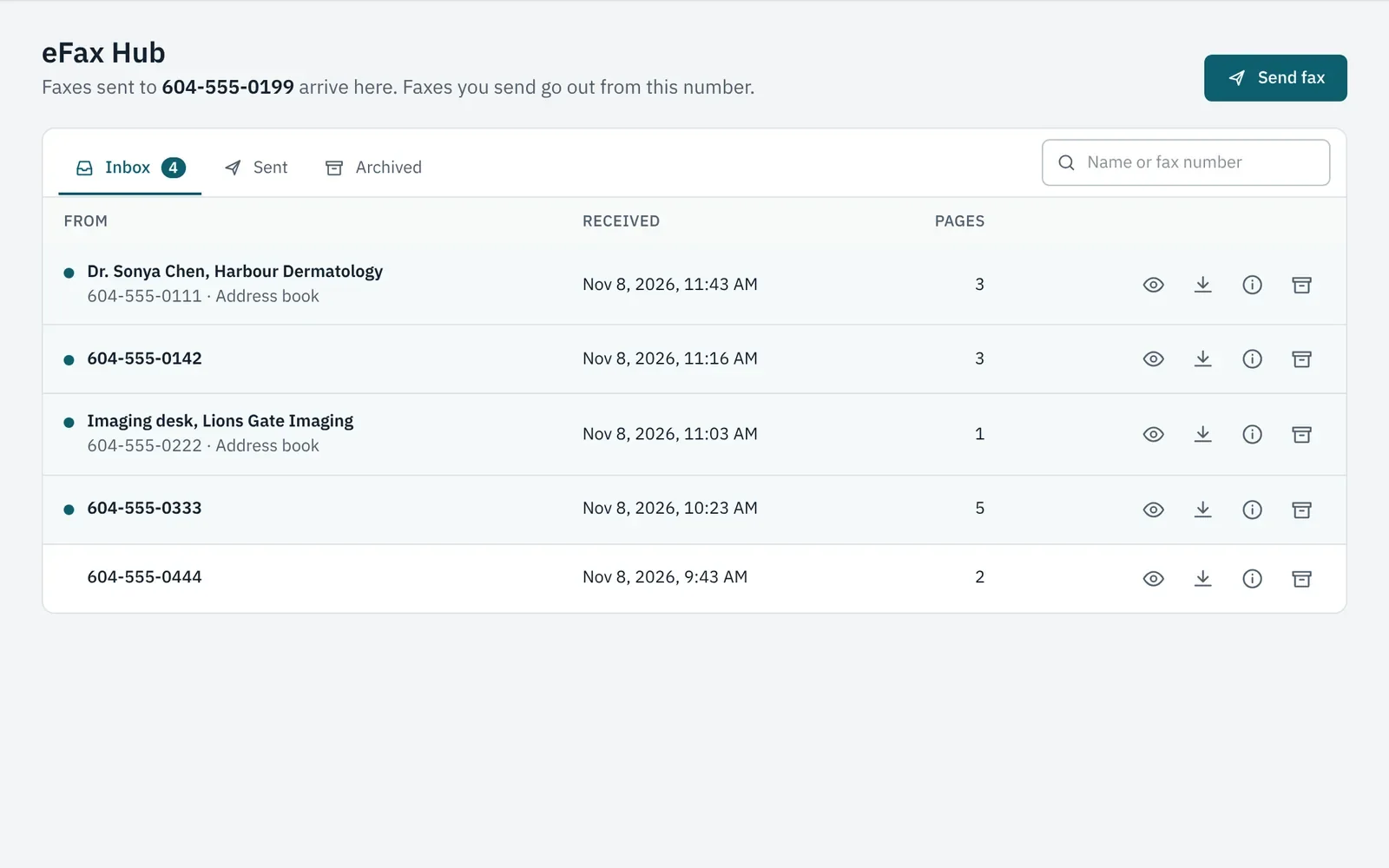
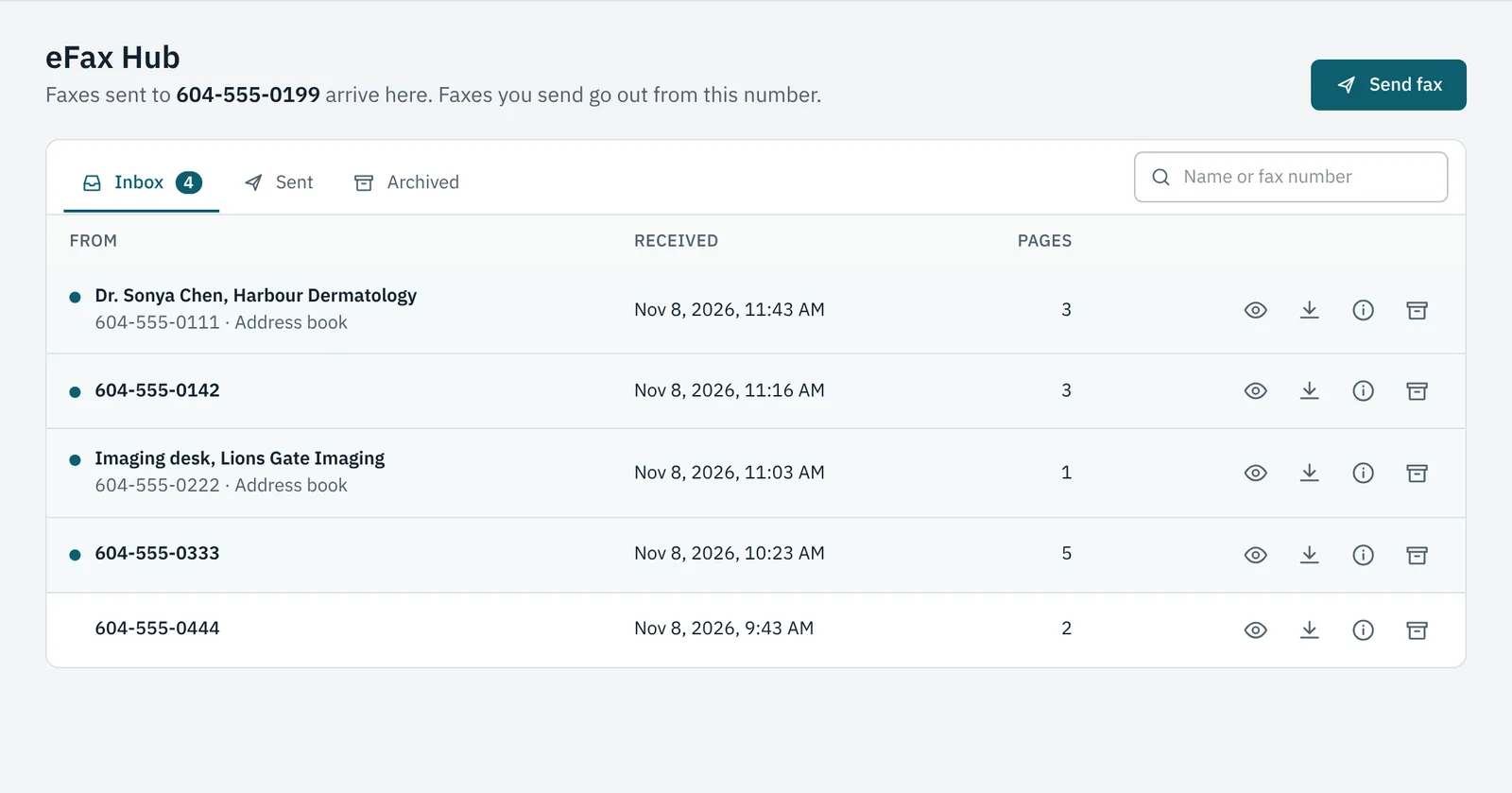
  • eFax Hub: every fax in a shared online inbox, filed to the right chart.
The Today dashboard showing a failed fax alert and online appointment requests waiting for an ID check

Why BC clinics choose Verified Clinic Connect

Built for BCFor BC family practice, clinics and nurse practitioners
MSP through TeleplanClaims under each practitioner's own number
Privacy by designDesigned around BC privacy law (PIPA)
Two-step sign-inAnd a tamper-evident audit trail
Works with your EMROr runs your whole practice
Patient appPlus a web portal for every patient

The product suite

Twenty-two modules.
Use one, or use them all.

Every module works on its own and works better together. Start where your clinic needs it most.

Scheduling and virtual care

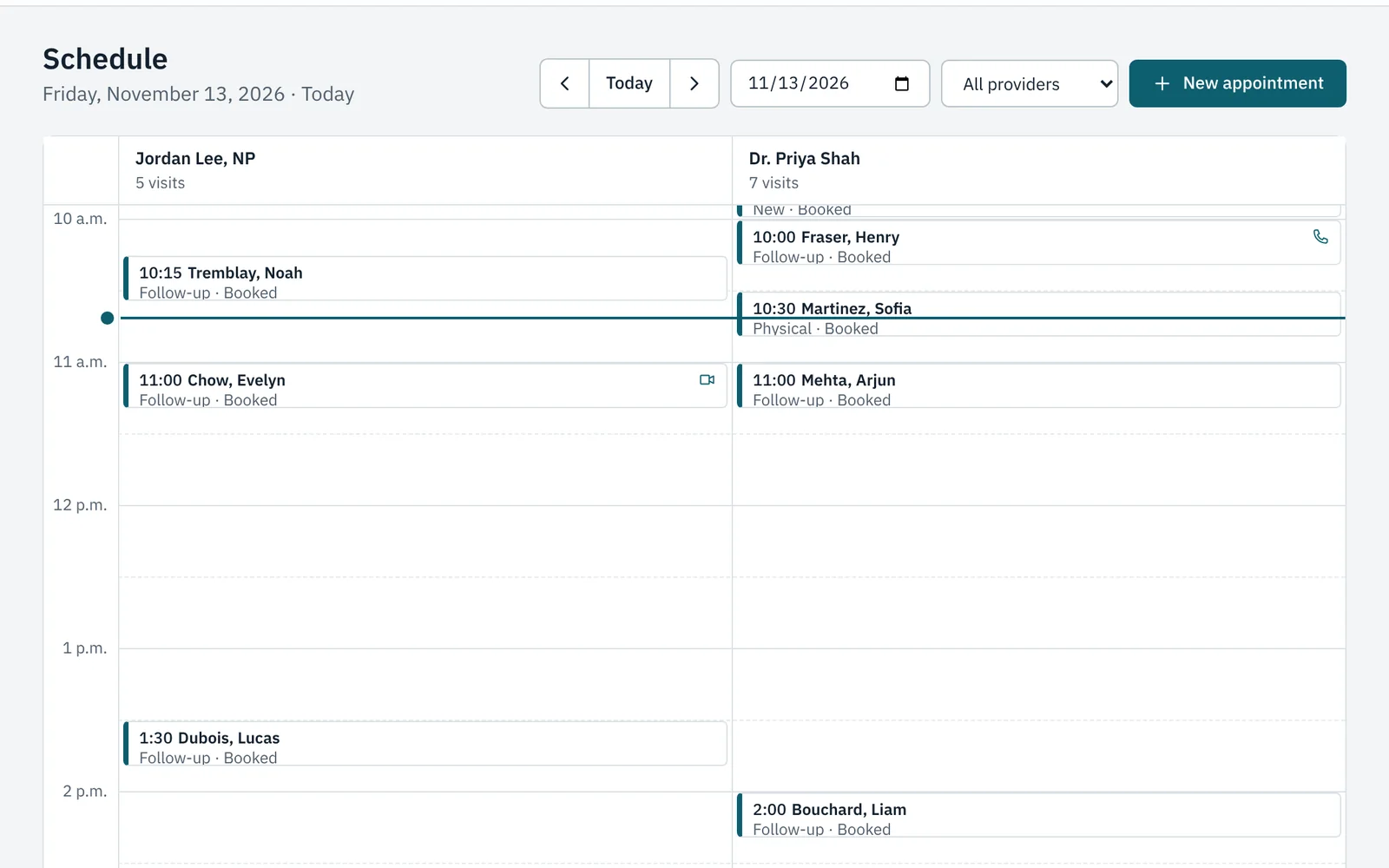
The day view for two clinicians, with each patient's status.

Clinical

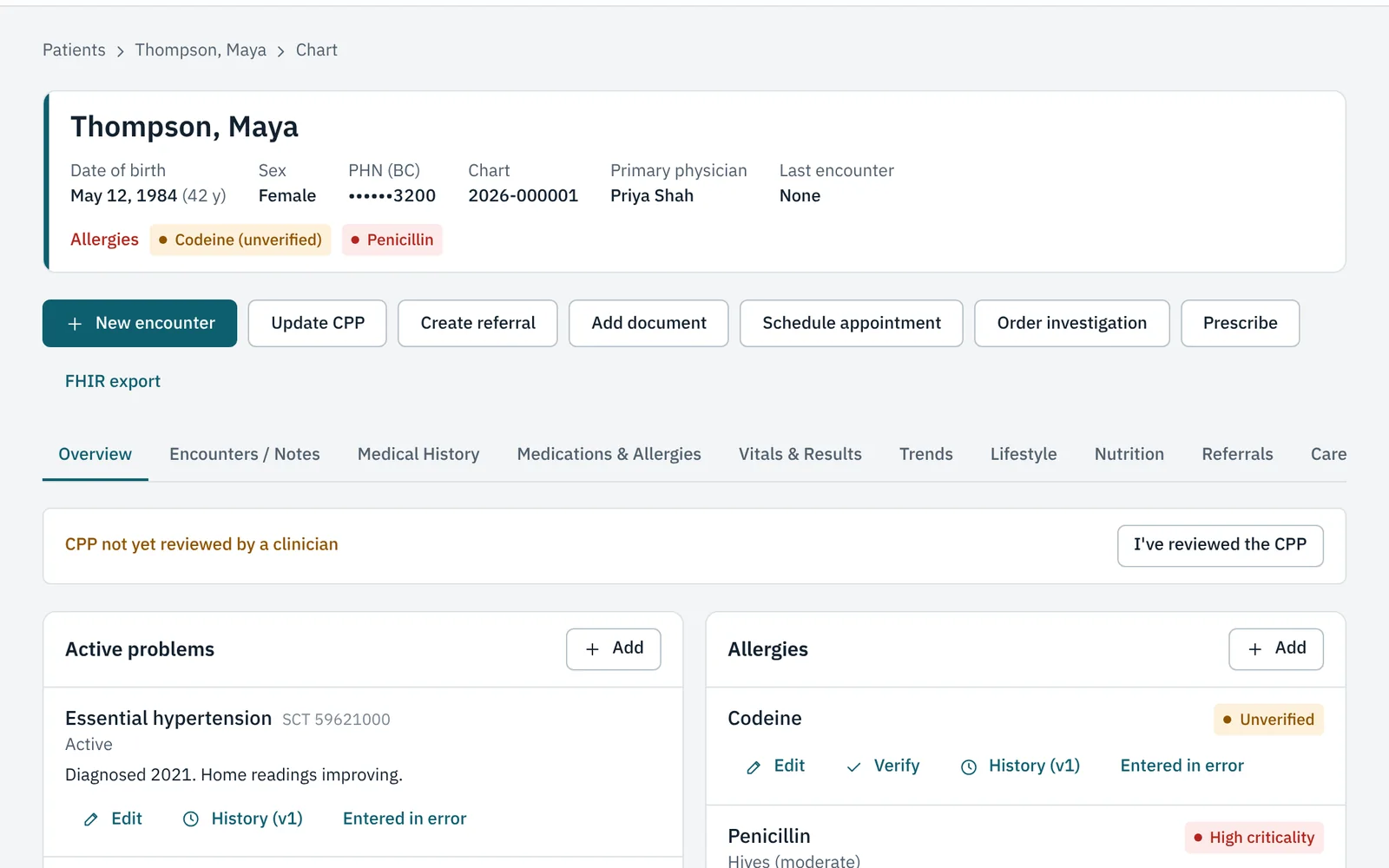
A patient's chart: active problems, allergies, and a tab for each part of the record.

Patients

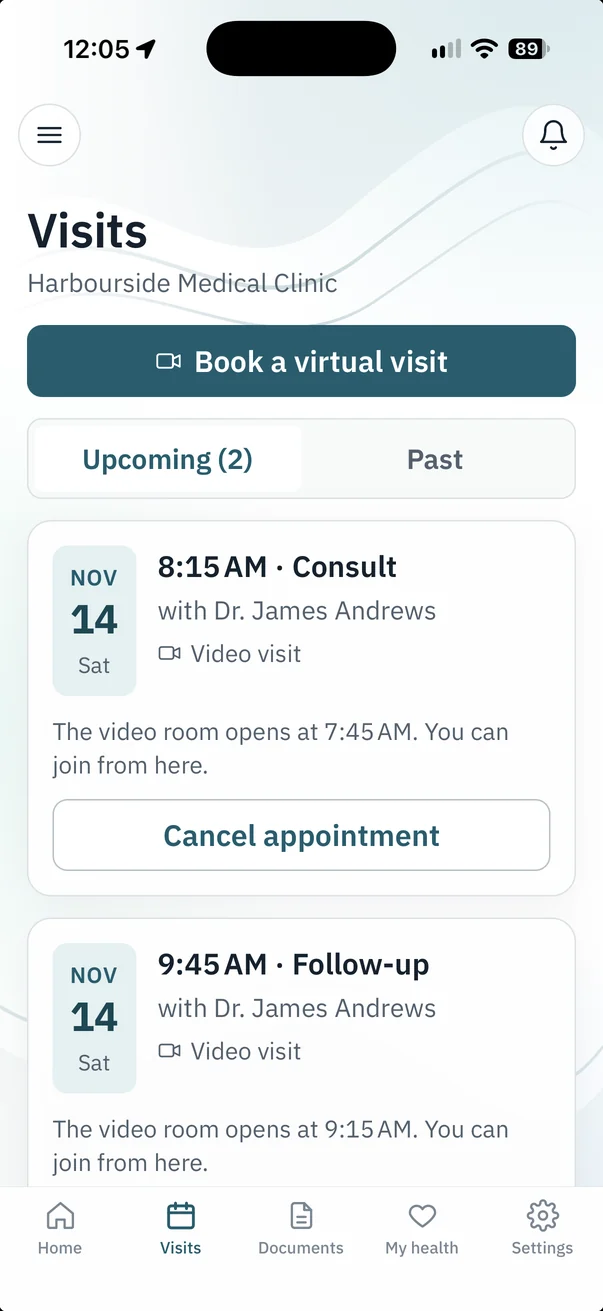
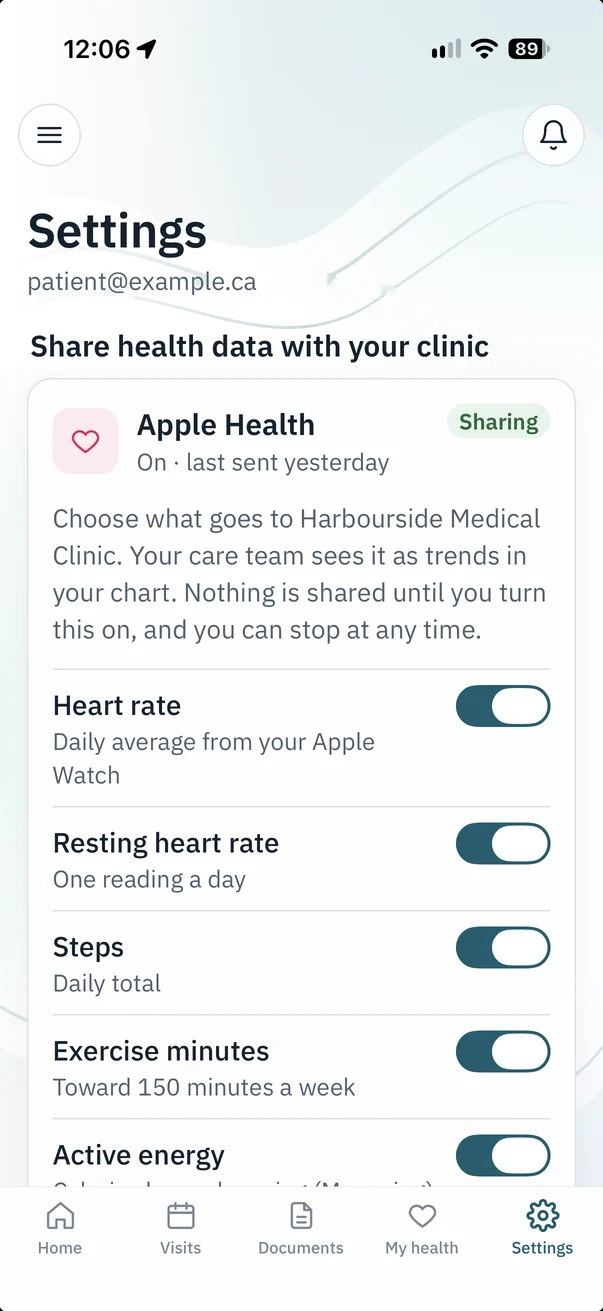
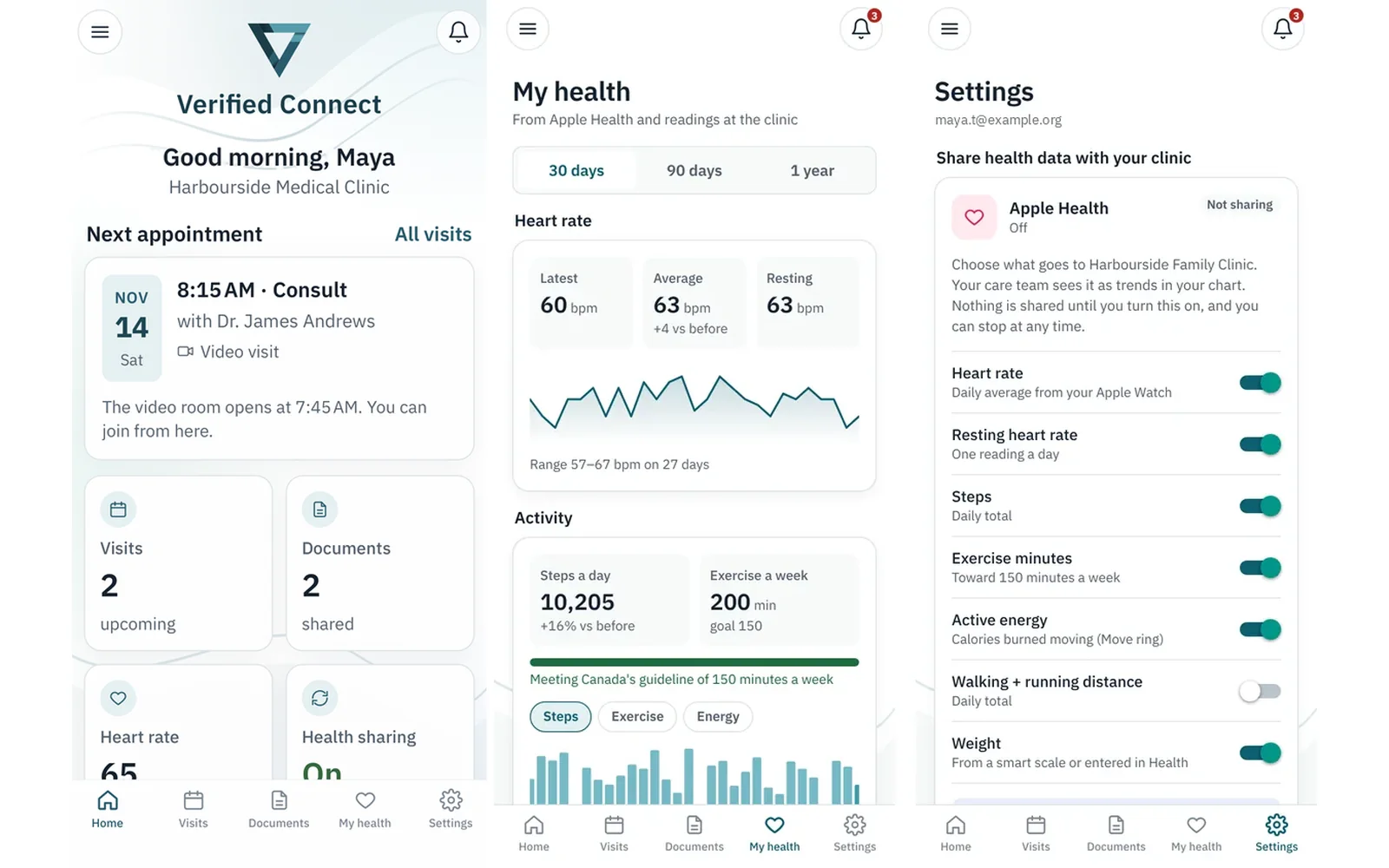
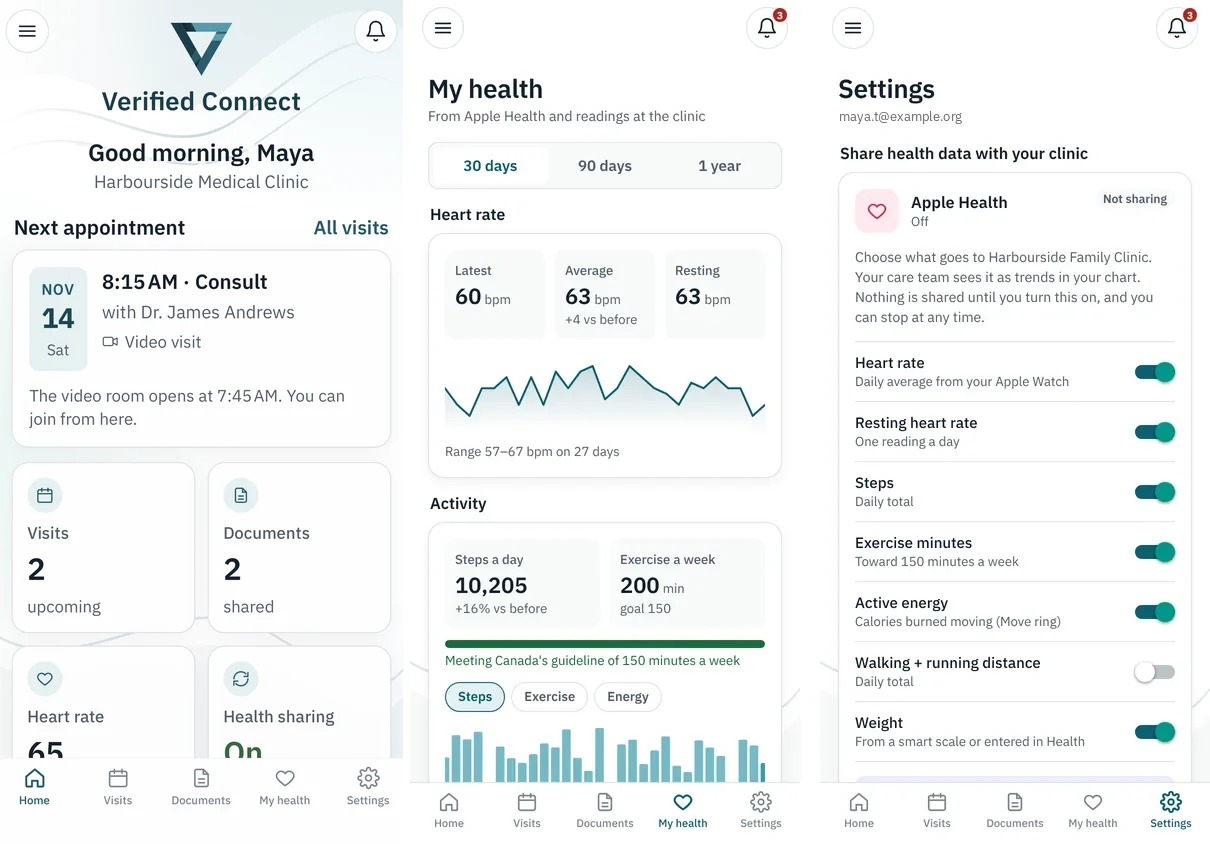
The Verified Connect app: the home screen, health trends and sharing settings.

Documents and communication

The clinic's fax inbox.

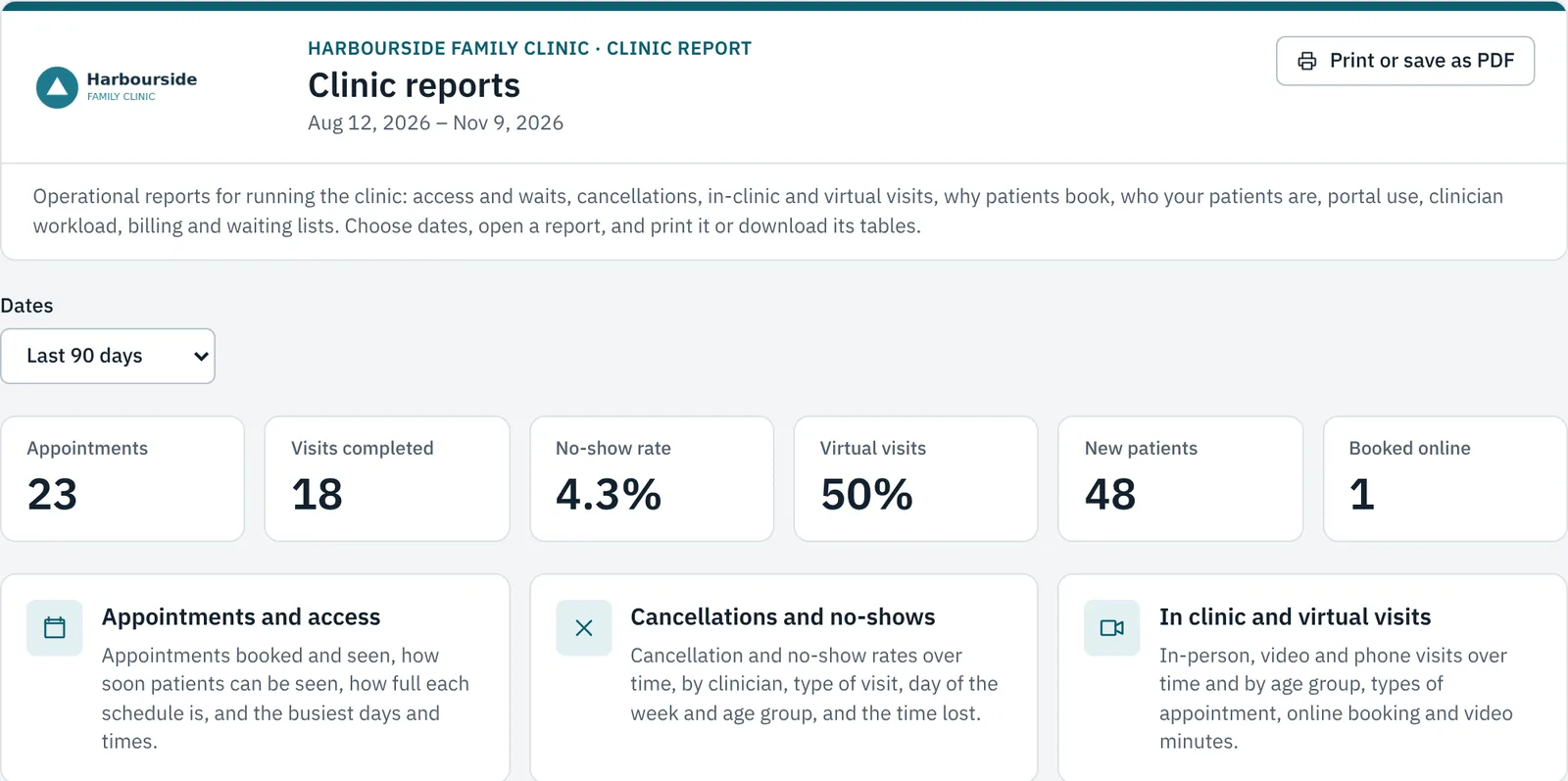
Billing and insight

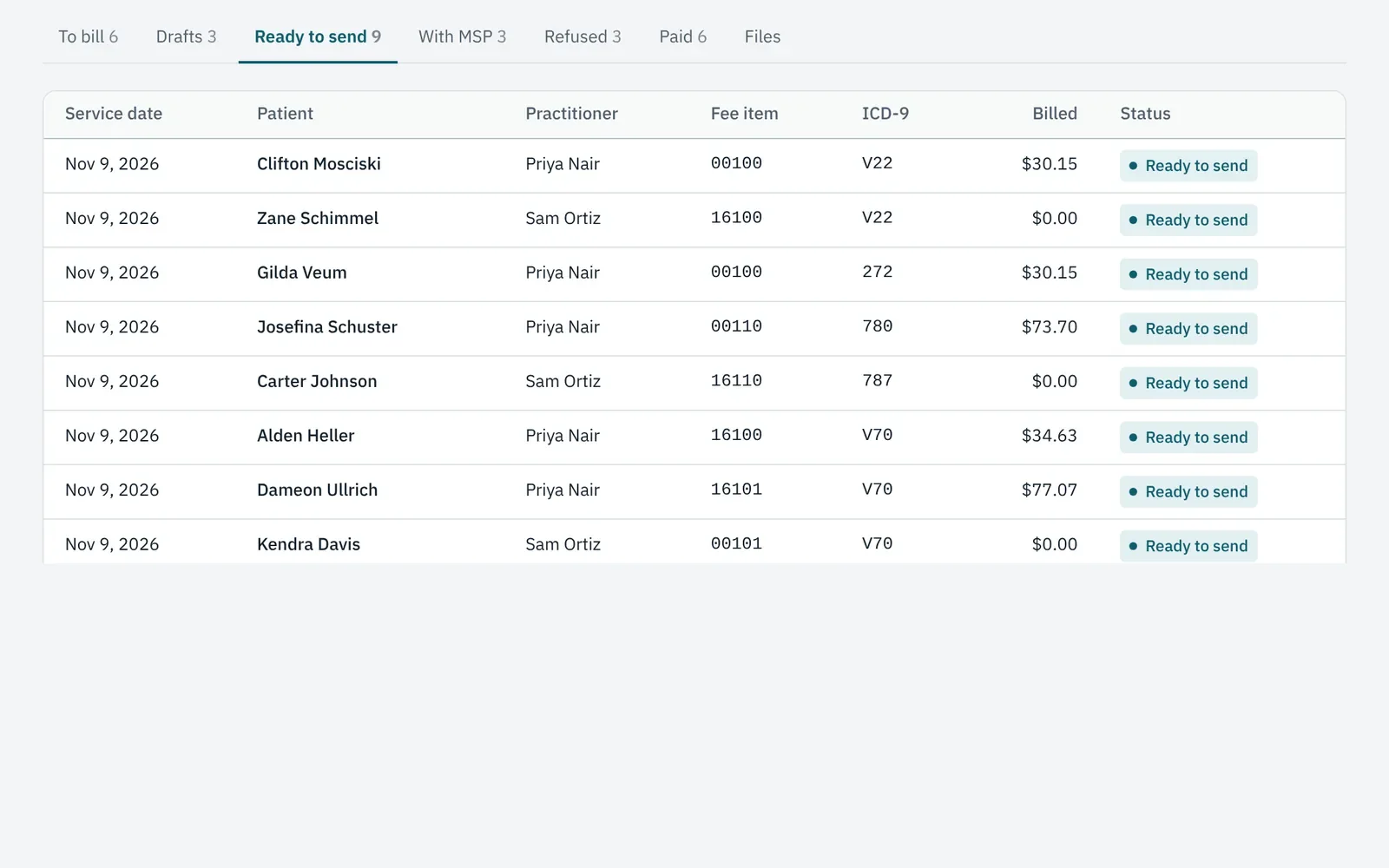
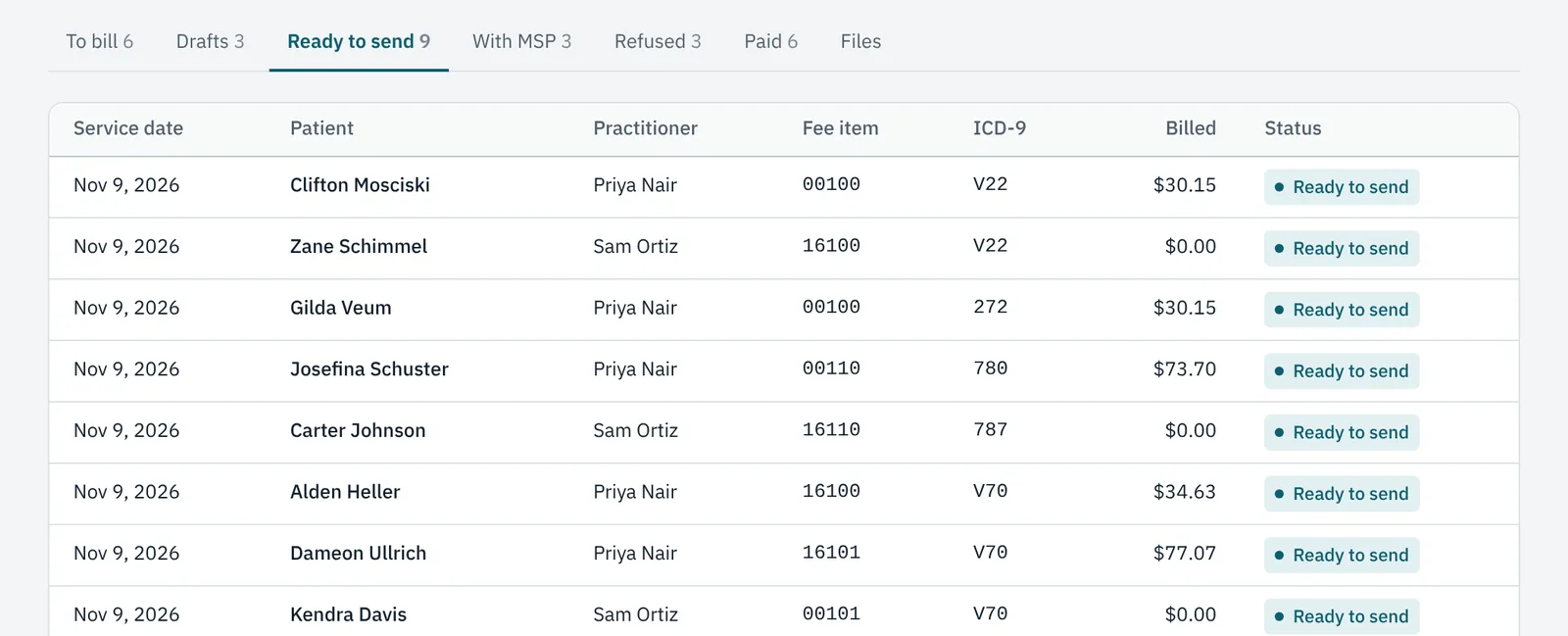
Claims ready to send to MSP, by practitioner.

Screens are from a demo clinic with fictional patients.

See it in action

Built around the jobs your clinic does every day

Virtual care and online booking

Virtual visits that patients can book themselves

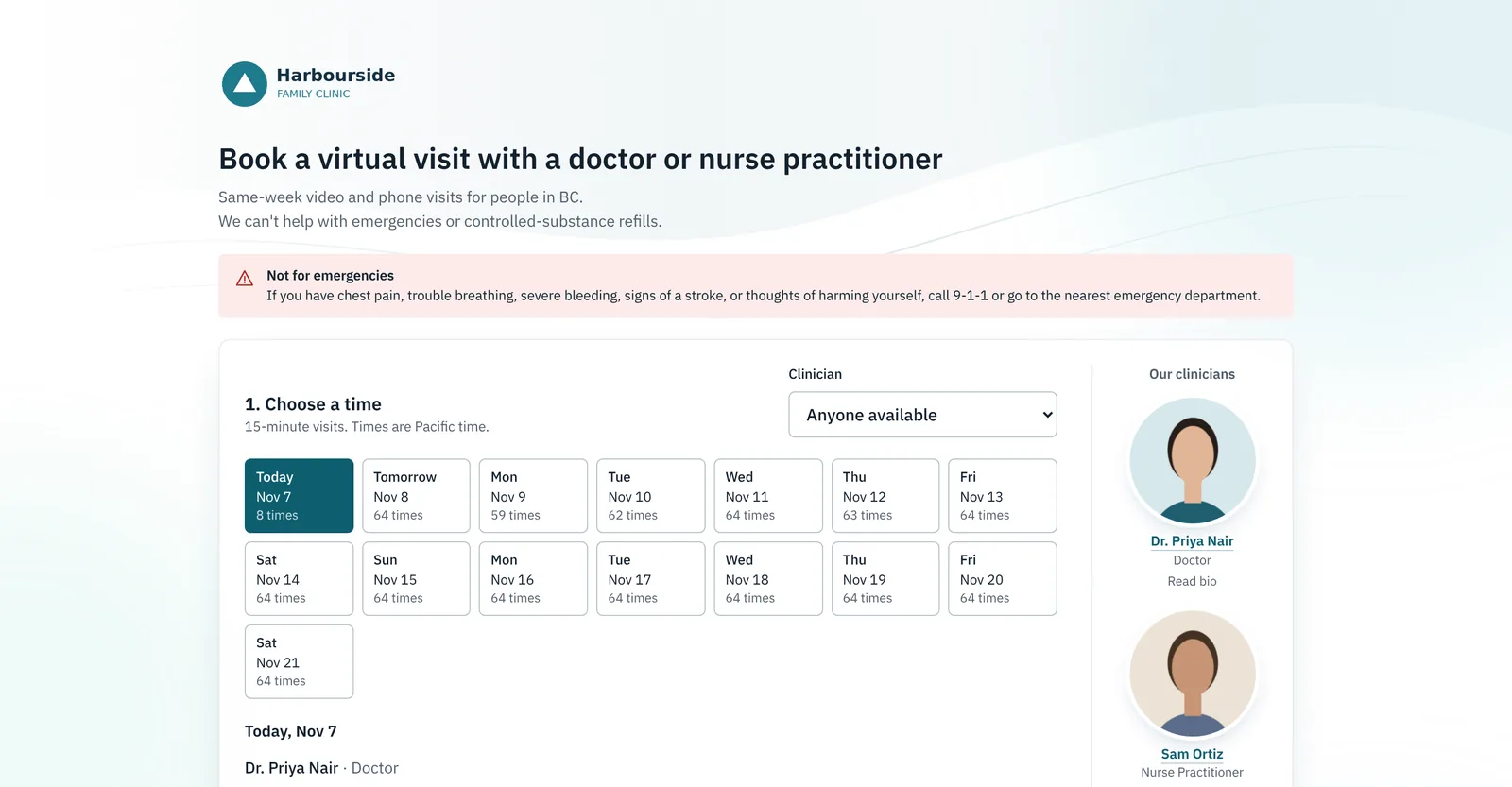
Patients pick a time on your clinic's booking page; the video room opens in their browser at the visit time.

  • Same-day video and phone visits with doctors and nurse practitioners.
  • ID check for new patients before the visit is confirmed.
  • Private-pay visits for uninsured patients, paid online.
  • Ready for BC's November 2026 virtual care billing changes.
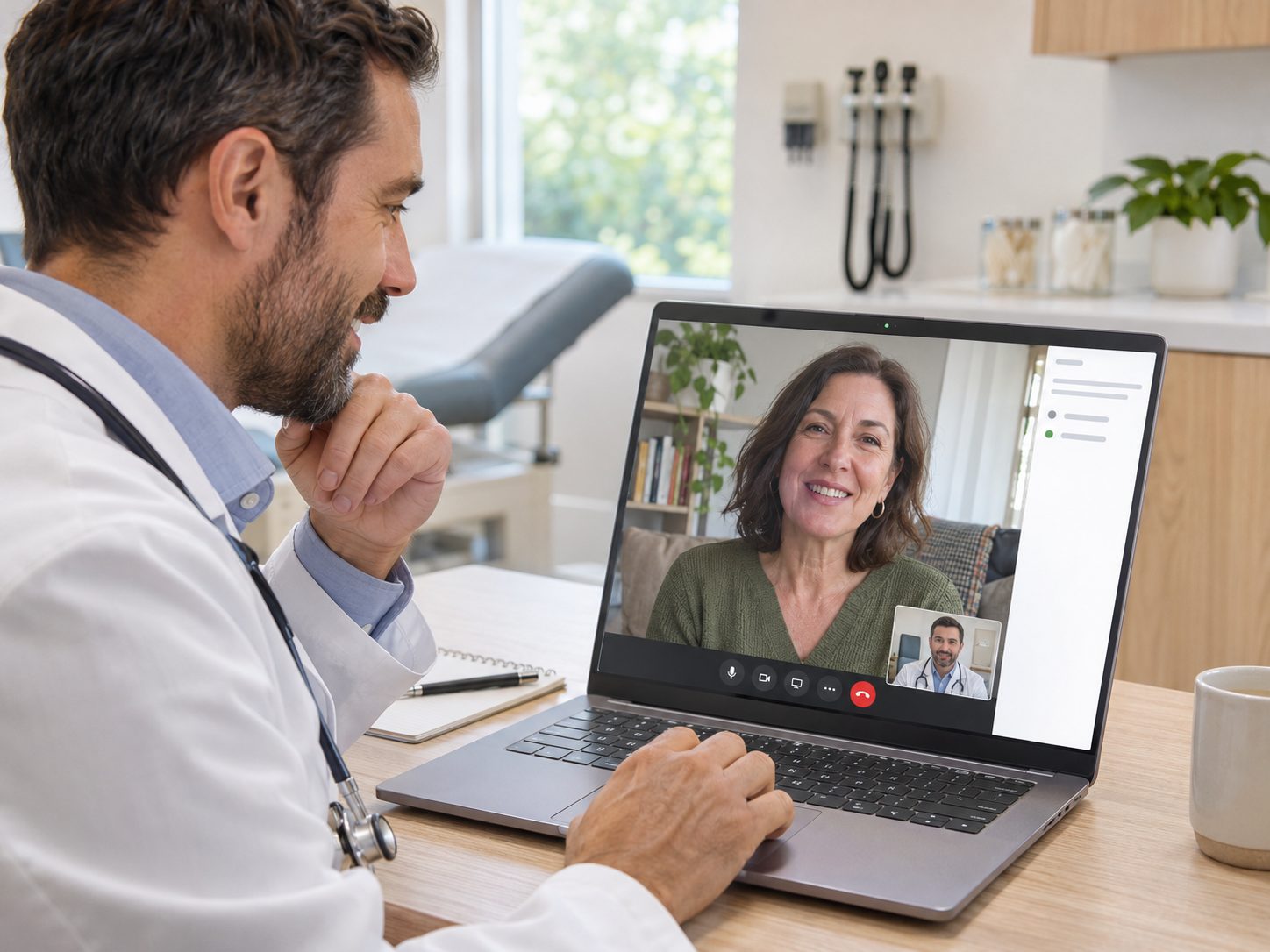
A physician on a video visit at a laptop in a consult room
PHOTO: physician-video.jpg1600 × 1200 px (4:3). A doctor on a video visit at a laptop, patient visible on screen.
The clinic's online booking page with available times for a doctor and a nurse practitioner

eFax, documents and referrals

Retire the fax tray

Every fax arrives in one shared online inbox. Open it, file it to the right chart, done.

  • Your clinic's own fax number, sent and received from any computer.
  • Bring your own number: port your existing fax number into Verified Connect, so you don't need to change your details.
  • Branded cover pages and an address book of specialists, labs and pharmacies.
  • Secure sharing of documents to patients by portal, email or text link.
  • Referrals through VerifiedSRP, tracked to the specialist's booking.

eFax on its own, from $9.99/month

A medical office assistant at the front desk, smiling at a patient
PHOTO: front-desk.jpg1600 × 1200 px (4:3). An MOA at a clinic front desk with a monitor, welcoming a patient.
The eFax Hub inbox listing faxes from a dermatologist, an imaging desk and other senders

MSP billing

Bill MSP from the visit, the same day

Claims are built from the appointment and sent to MSP through Teleplan under each doctor's or nurse practitioner's own number.

  • Health numbers and claim details checked before claims go out.
  • Refusals and remittances come back into the same screen.
  • No billing service fees taken off every claim.
MSP Billing showing claims ready to send to MSP, by practitioner, with fee items and amounts

Patient portal and app

Fewer "can you send me my results?" calls

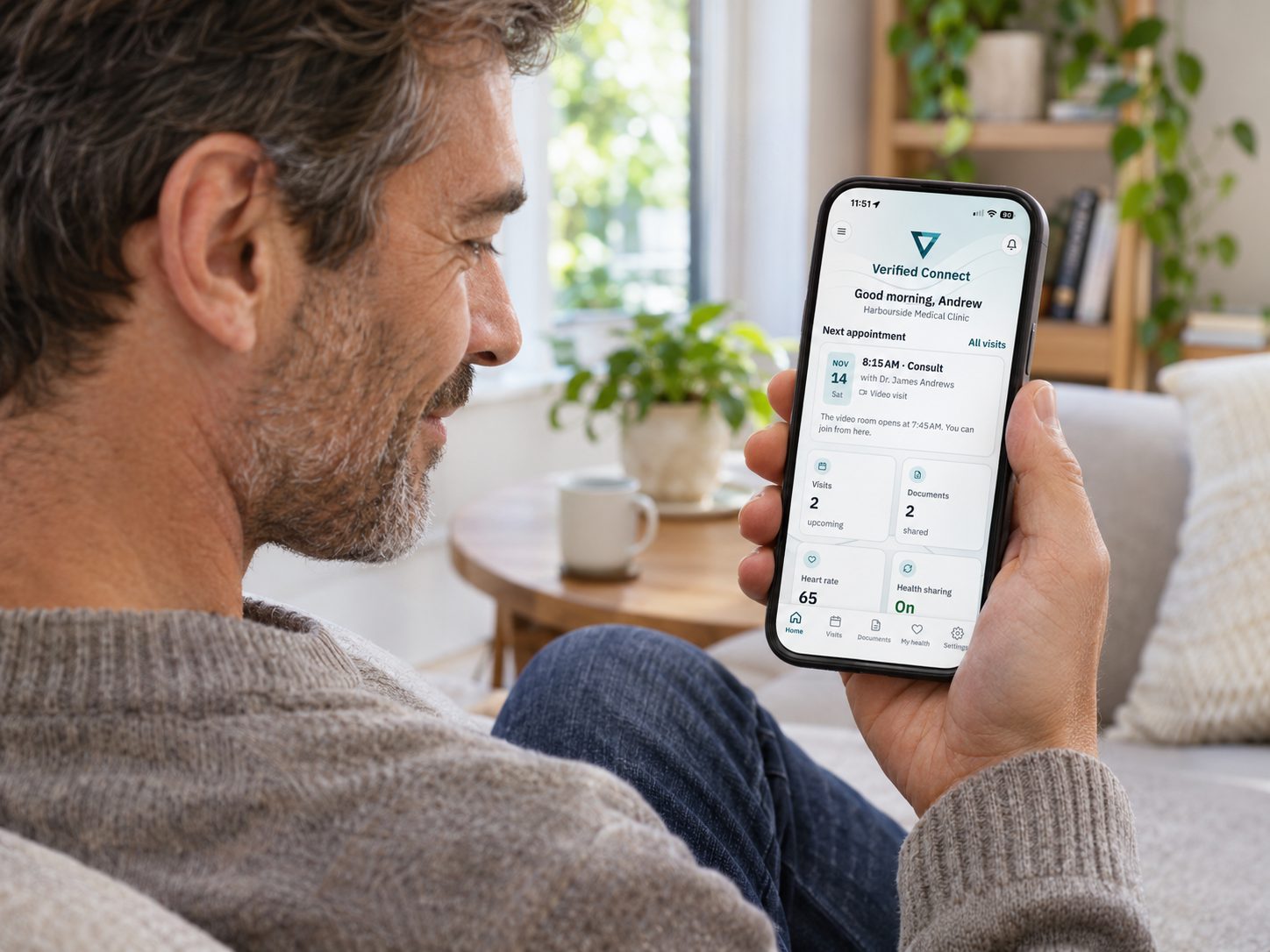
Patients see their visits, documents and messages on their phone, and share the health data they choose.

  • Book, change and join visits from the app or the web portal.
  • Apple Health sharing: activity, heart rate, sleep and CPAP use, and weight.
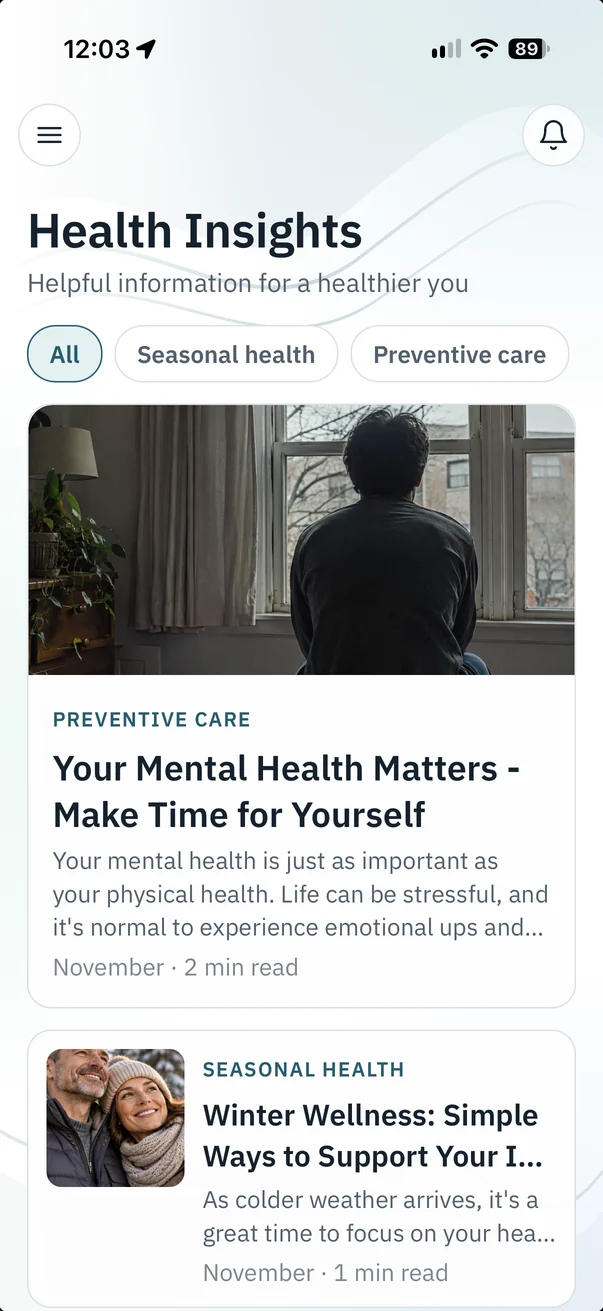
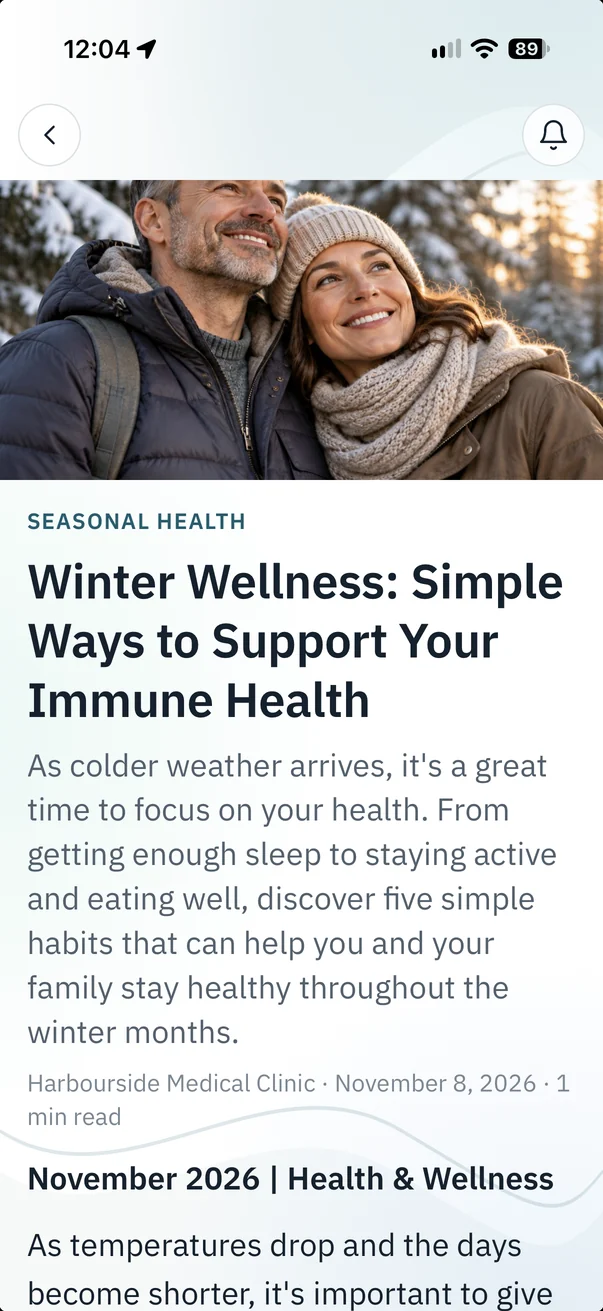
  • Health Insights: news and health articles from the clinic that encourage a healthy lifestyle.
  • Locks itself after 5 minutes; unlocks with Face ID or the phone's passcode.
A patient at home checking an upcoming appointment on their phone
PHOTO: patient-phone.jpg1600 × 1200 px (4:3). An adult patient at home, relaxed, looking at their phone.
The Verified Connect patient app showing the home screen with the next appointment, health trends and health sharing settings

Health trends and Verified Clinical Intelligence

Weeks of home readings, ready in seconds

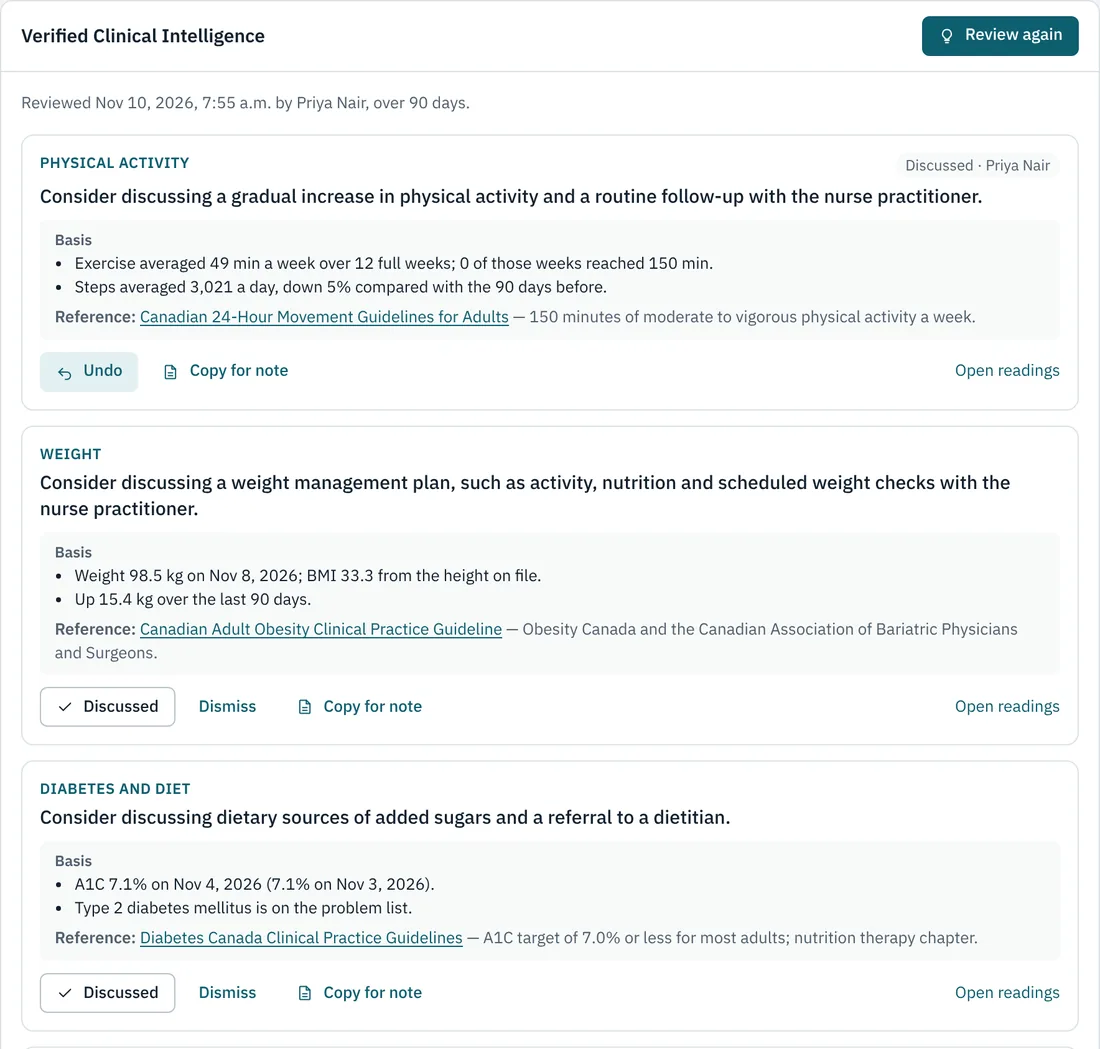
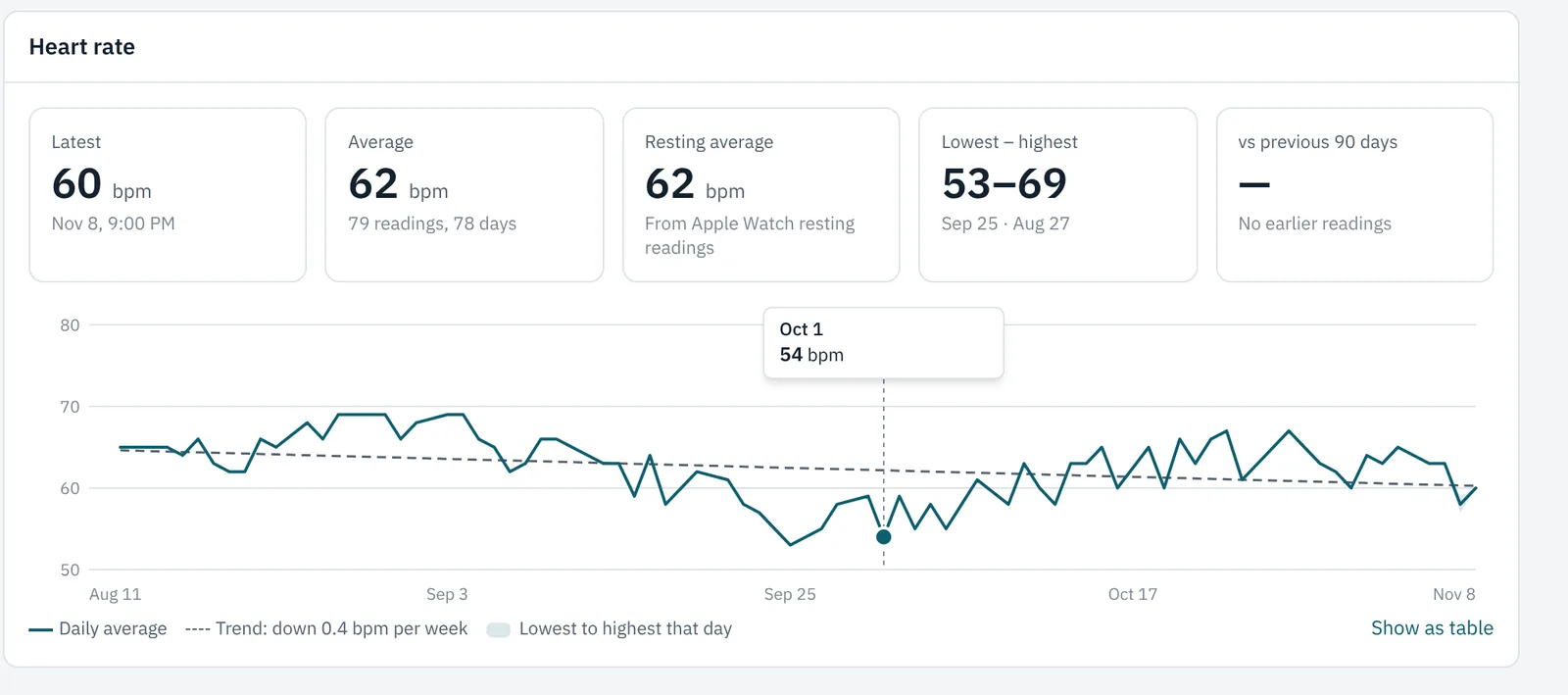
Patients' Apple Health data shows as clear trends in the chart. When a clinician asks, Verified Clinical Intelligence lists guideline considerations from those readings, each with the readings and guideline it rests on.

  • Only when a clinician asks, and only clinicians see it.
  • Every item shows its basis: the readings, the dates and the Canadian guideline.
  • The clinician decides: mark it discussed or dismiss it, and it's recorded.
A heart rate trend chart over 90 days in the patient's chart

Dermatology clinics

A skin chart, and photos patients send securely from the app

Set your clinic type to Dermatology and every chart gets a Dermatology tab, alongside SOAP notes for consult letters, referrals and billing.

  • Skin visits: history and itch, Fitzpatrick type and skin cancer risk, examination and dermoscopy, severity scores (BSA, IGA, PASI, EASI, DLQI, Hurley), procedures and biopsies, and the assessment and plan.
  • Lesion watch list: each lesion labelled L1, L2 and so on, with body site, size, concern and a review date. Sending a specimen sets a pathology follow-up task.
  • Clinical photos, not documents: filed by lesion and date, encrypted, stripped of location and camera data, and blurred until clicked. Only physicians and NPs can open them, and two can be compared side by side.
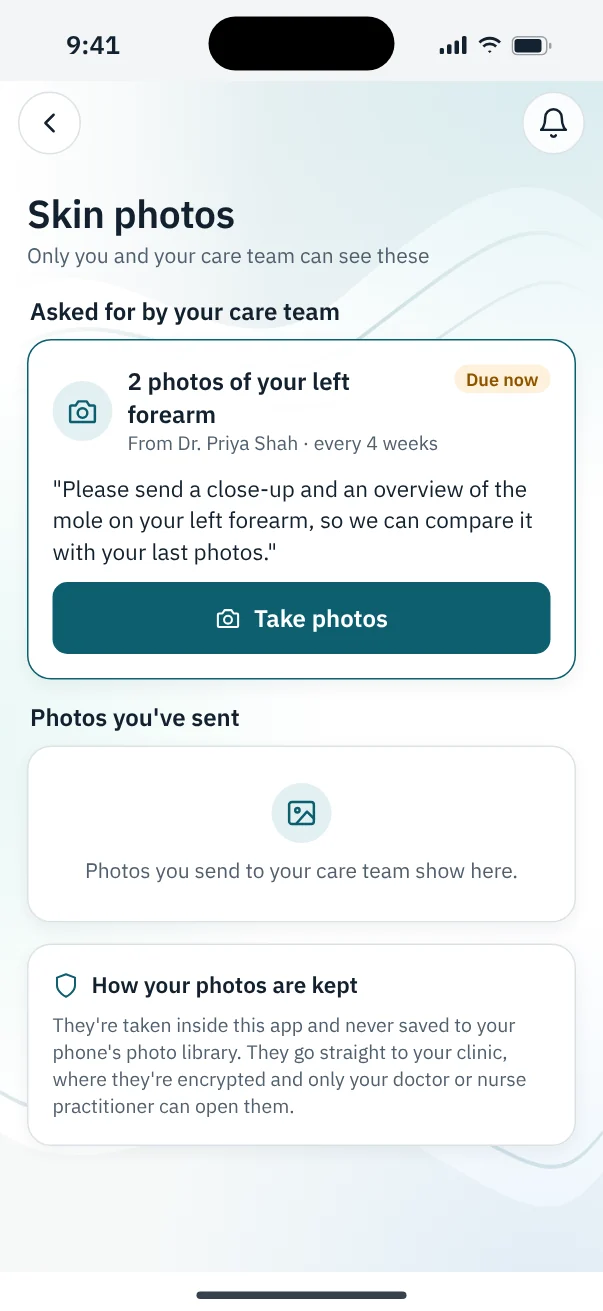
  • Photos from the patient's app: ask once or every few weeks. Patients take them with the app's own camera behind Face ID, blurry or dark shots are caught for a retake, and nothing is saved to their phone.
  • Every look is logged in plain words, such as "Photo of lesion L2 opened by Dr. Shah".
A patient's Skin photos screen: Dr. Priya Shah has asked for 2 photos of the left forearm every 4 weeks, and the photos are due now

Lifestyle diary, for family practice

Real habits to talk about, not "I think I eat pretty well"

Patients log meals and daily numbers in the app, then choose which weeks to share. It appears in a Lifestyle tab in their chart.

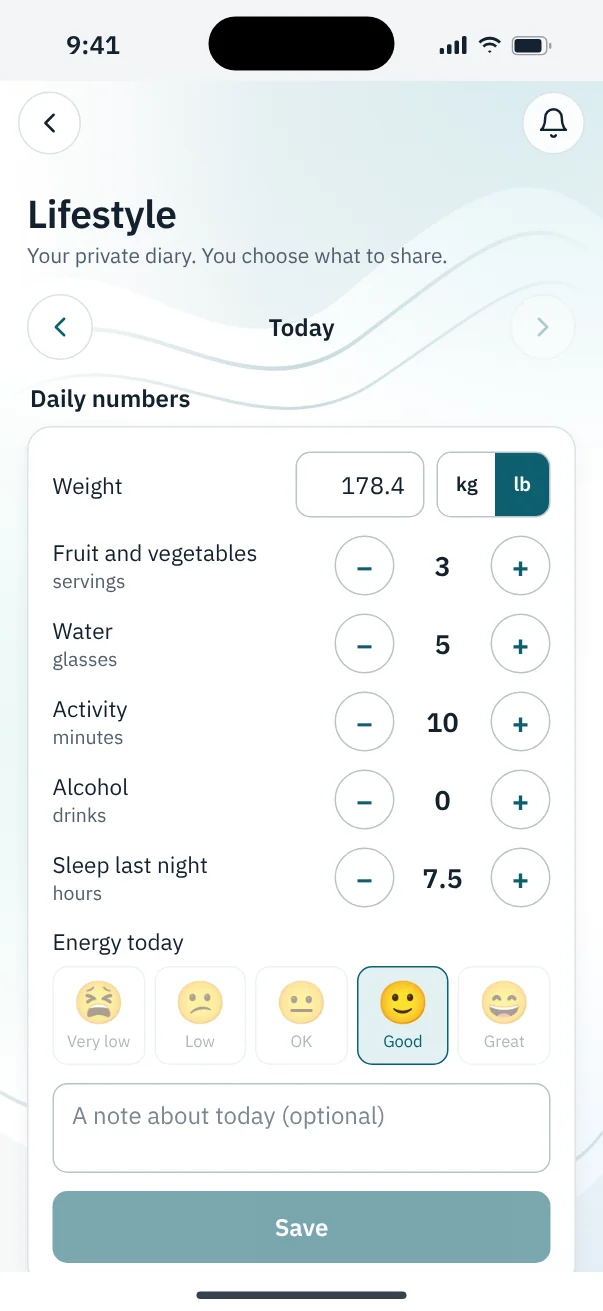
  • What patients record: weight in kg or lb, water, fruit and vegetables, activity, alcohol, sleep and energy, and each meal with its time, portion and tags such as vegetables, takeout or sweets.
  • Private until shared: patients pick a period, such as the last two weeks, can keep sharing new entries, and can stop at any time.
  • What the doctor sees: a summary (meals a day, how many had vegetables, treats and takeout, activity, sleep and the weight trend), each day's numbers and the meal diary, marked as patient-entered.
  • Nothing slips by: sharing sends the doctor a task, and they mark it reviewed.
  • Weight-sensitive patients aren't asked for their weight, and none is stored.
The Lifestyle diary in the patient app, with today's weight, servings, water, activity, sleep and energy

Getting started

Start small. Grow when you're ready.

Book a 15-minute demo

We show you the modules that fit your clinic, on a demo clinic, and answer your questions.

Start with one module

We set it up with you and walk your team through it. Nothing else in the clinic has to change.

Add more as you go

Turn on more modules when you're ready, up to running the whole practice on Verified Clinic Connect.

Your own Customer Success Manager

A Customer Success Manager guides you and your clinic through onboarding, step by step, from setup and training to going live. You're never on your own, and switching is seamless and easy.

Security and privacy

Patient information protected at every step

Built for health care from the start, around BC's privacy law.

Two-step sign-in

Staff sign in with two-step verification, and clinics can be alerted whenever a doctor signs in.

The right access for each role

Front desk, nurses, doctors and managers each see only what their role needs.

Tamper-evident audit trail

Every view of and change to a patient's record is logged, and the log can be checked for tampering.

Encrypted sensitive data

Sensitive fields are encrypted in the database, and every connection is encrypted in transit.

Patients stay in control

Patients choose what health data to share and can stop at any time. Readings already sent stay in their record.

Clinical tools that support, not replace

Verified Clinical Intelligence only runs when a clinician asks, shows its basis, and never diagnoses or prescribes.

Questions

Frequently asked questions

Do we have to replace our EMR?

No. Many clinics start with one module, such as eFax, virtual visits, MSP billing or the patient app, and keep their current EMR. Clinics that want one system can run their whole practice on Verified Clinic Connect, including charting.

Can we start with just one module?

Yes. Every module works on its own. We set up the first one with you, walk your team through it, and you add more when you're ready.

Is it built for British Columbia?

Yes. It bills BC MSP through Teleplan under each practitioner's own number, sends prescriptions to BC pharmacies, sends referrals through VerifiedSRP, and is designed around BC privacy law (PIPA).

Do patients need to install anything for a video visit?

No. Patients join a video visit from a link in their browser on a phone, tablet or computer. Patients who want more can use the Verified Connect app for appointments, documents, reminders and health sharing.

How is patient information protected?

Staff sign in with two-step verification, each person sees only what their role allows, sensitive fields are encrypted, and every access to a patient's record is written to a tamper-evident audit log. Patients choose what health data they share and can stop at any time.

Does it work for dermatology clinics?

Yes. Each clinic has a clinic type. Dermatology clinics get a Dermatology tab in every chart, with skin visits, severity scores, procedures and biopsies, a lesion watch list and encrypted clinical photos, alongside SOAP notes for letters and billing. Optometry clinics get eye exams, with glasses and contact lens prescriptions, in place of SOAP notes.

Can patients send skin photos to their dermatologist securely?

Yes, through the Verified Connect app. The dermatologist asks for photos, once or on a schedule. The patient opens the photos section with Face ID or their passcode and takes the photos with the app's own camera, so they never go to the phone's photo library. Photos are checked for blur and lighting, sent encrypted to the chart, blurred until clicked, and only physicians and nurse practitioners can open them. Every view is logged.

What can patients track in the Lifestyle diary?

Weight (kg or lb), water, fruit and vegetables, activity, alcohol, sleep, energy and each meal. The diary is private until the patient shares a period with their care team, and it then appears in the Lifestyle tab of their chart. It is available to family practice (general medicine) clinics.

How is it priced?

Per clinician per month, for the modules you choose, with front-desk users included. Book a demo and we'll price the modules your clinic needs.


Book a demo

See Verified Clinic Connect on your clinic's workflow

Tell us what you'd like to fix first. We'll get in touch to set up a 15-minute demo at a time that suits you.

The Verified Connect team walking a clinic manager through the platform
PHOTO: demo-team.jpg1600 × 1200 px (4:3). Someone from Verified showing the platform on a laptop to a clinic manager and doctor.
What would you like to see? (optional)

We use these details only to reply to you about Verified Clinic Connect. See how we handle your information.

Ready for fewer logins, calls and faxes?

Start with one module, and add more when you're ready.

Book a demo